
Mail settings
Mail forwarding
Send feedbackForwarding sends your incoming mail on to another address automatically. Before it starts, both you and the address you're forwarding to have to confirm — which stops anyone pointing your mail somewhere you didn't agree to.
Availability: Mail forwarding is part of the Business and Pro packages — it isn't included on Free or Starter. Check Plans & pricing for what each package includes, or open Admin → Subscription to see what your workspace is on.
Add a forwarding address
- Open Mail forwarding: Select the Settings (gear) icon in the header, then choose Mail forwarding under Mail settings.
- Enter the address: Add the address you want your mail sent to. It can't be your own address, and you can add up to 20 in total.
- Confirm both steps: The address appears as waiting until the two checks below are done.
The two confirmation steps
Adding an address starts two separate checks. Forwarding doesn't begin until both are complete.
- Prove it's you: NevTan Mail emails a 6-digit code to your own mailbox. Enter it on the forwarding screen. The code lasts 10 minutes, and you get 5 attempts before you need a new one. You can ask for another after 60 seconds.
- The other address agrees: Once your code is accepted, a confirmation request goes to the forwarding address. Whoever receives it has to open the link and accept. That request is valid for 7 days.
What the statuses mean
Verify it's you — the code is waiting for you. Waiting for confirmation — your part is done and the other address hasn't accepted yet. Confirmation expired — nobody accepted within 7 days; send the request again.
The second email goes somewhere you may not see
The confirmation request lands in the forwarding address's inbox, not yours. If it's an address you don't check, ask whoever does to look for it — including in their spam folder.
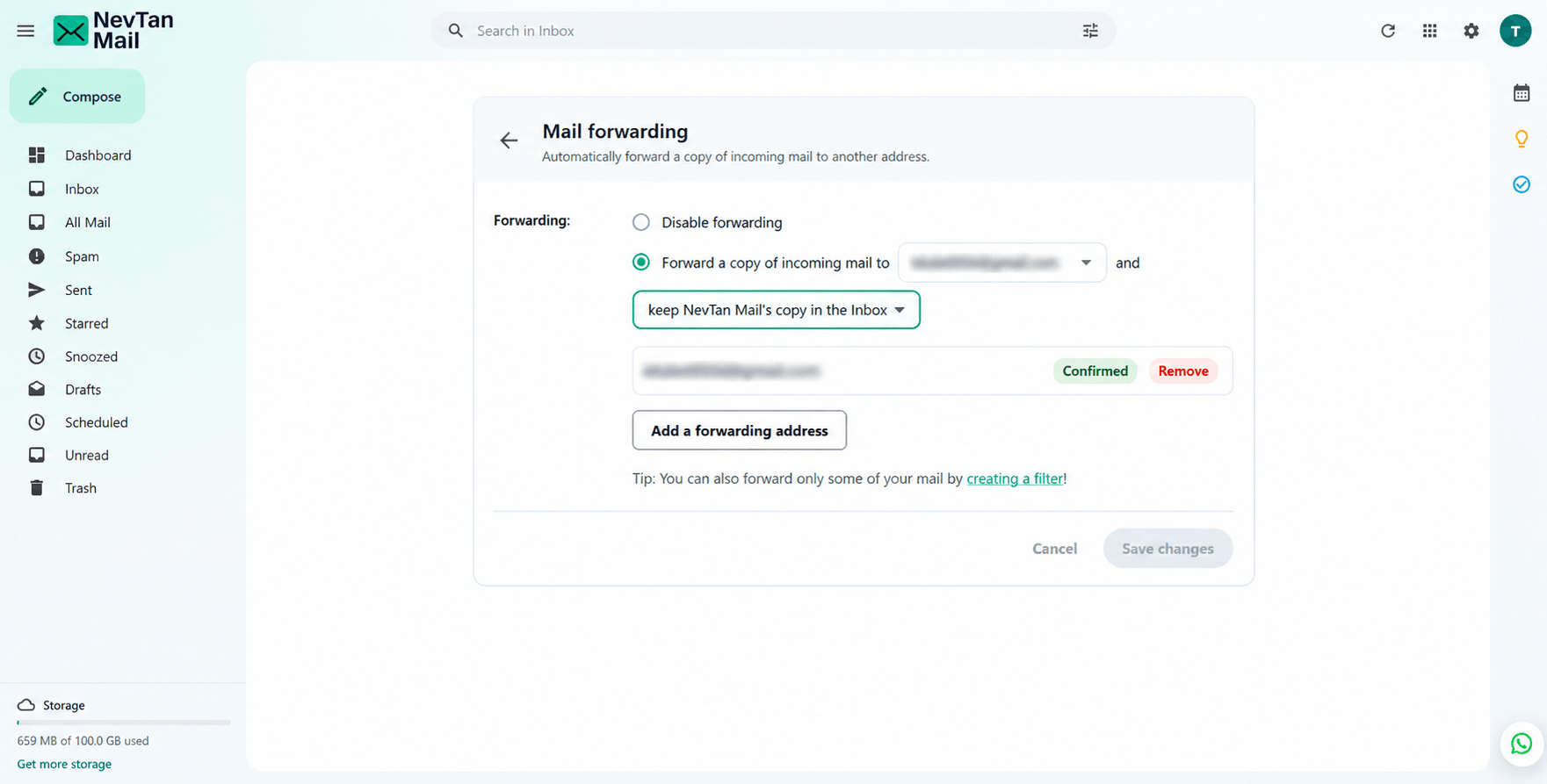
Turn forwarding on
Once an address is confirmed, switch forwarding on and choose that address. New mail is forwarded from then on — forwarding never applies to mail that arrived earlier.
What happens to your copy
Forwarding sends a copy onward; it doesn't have to remove anything from your mailbox. Choose what happens to NevTan Mail's own copy:
| Option | What it does |
|---|---|
| Keep it in the Inbox | Nothing changes — the message stays unread in your inbox. |
| Mark it as read | The message stays, already read, so your unread count stays clean. |
| Archive it | The message leaves the inbox but stays in All Mail. |
| Delete it | The message goes to Trash. |
Keep a copy while you test
Start with Keep it in the Inbox until you've seen mail arriving at the other address. Deleting your copy from the outset means a forwarding problem loses mail.
Forward only some mail
Forwarding everything isn't always what you want. A filter can forward just the messages that match a search — mail from one sender, or anything with a word in the subject — and leave the rest alone. Create one from the forwarding screen, or see Filters.
Change or stop forwarding
- Stop forwarding — switch it off. The addresses stay confirmed, so you can switch it back on without repeating the checks.
- Remove an address — delete it from the list. Adding it again later means both confirmation steps again.
- Change where mail goes — add and confirm the new address first, then select it. Forwarding uses one address at a time.
Forwarding needs a NevTan Mail mailbox
If the screen says forwarding isn't available, the account has no mailbox hosted here — an account created through another NevTan product, for example. Forwarding works for mailboxes on NevTan Mail.